
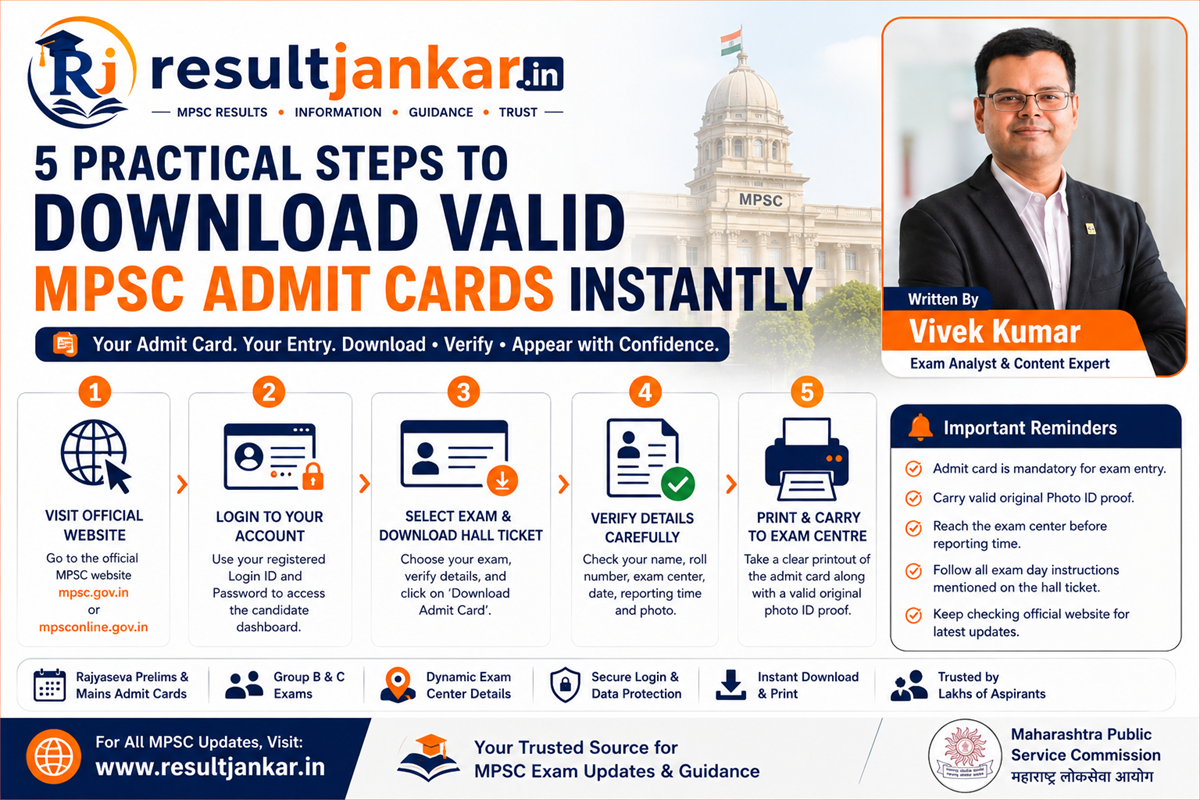
5 Practical Steps to Download Valid MPSC Admit Cards Instantly
Quick Answer
To view and download official MPSC admit cards, candidates must access their personal profiles through the online application system on the state commission’s website or check rapid updates via the Result Jankar Home Page. The Maharashtra Public Service Commission releases these mandatory hall tickets separately for every stage of the selection process. Shortlisted applicants must input their registered email ID or mobile number alongside their account password to unlock their dashboards. Printing a physical copy of this admission certificate is absolutely compulsory to verify your designated exam center address, specific shift timings, and roll number authentication guidelines at the venue gates.
Introduction
Conquering the highly competitive civil services exams across Maharashtra requires deep subject command, months of discipline, and continuous mock practice. Yet, amidst the intense pressure of balancing complex general studies topics with descriptive main papers, structural administrative steps are just as crucial. For thousands of hard-working aspirants, downloading your official call letters smoothly represents the most critical final step before walking into the examination hall.
Losing access to your candidate dashboard or misinterpreting a shift timing guideline during high-stakes release weeks can create immense panic.
To help you manage this final operational phase flawlessly, this guide presents a clear approach to downloading your official MPSC admit cards. By grouping direct access paths with verified state commission patterns, we outline the exact steps needed to secure your hall tickets, verify your test center data, and fulfill all test-day regulations with total peace of mind.
The Rolling Architecture of Civil Service Admission Logs
The commission does not issue a single, blanket hall ticket for the entire duration of a recruitment cycle. Instead, to maintain absolute compliance across multiple tiers of screening, separate MPSC admit cards are rolled out dynamically across the official portal approximately 5 to 10 days prior to each scheduled testing window:
[MPSC Rajyaseva Combined Prelims] ──> Separate Screening Hall Ticket Issued
                                                 │
[State Service Descriptive Mains]  ──> Separate Descriptive Stage Card Issued
                                                 │
[Personal Personality Interview]   ──> Separate Final Interview Call Letter Issued
- MPSC Rajyaseva Prelims Hall Ticket: The initial gate pass that grants entry to the combined preliminary examination rooms across the state.
- MPSC Mains Admit Card: A specialized document issued exclusively to candidates who clear the preliminary cut-offs, detailing descriptive optional papers and multi-day paper timetables.
- Interview Call Letter: The final validation pass that outlines your specific timing blocks for the face-to-face evaluation boards at the administrative headquarters.
The Importance of Core System Verification
While tracking your updates via integrated exam aggregators saves huge blocks of daily search time, validating high-stakes timelines requires utilizing direct links. Aspirants should develop a routine of checking sudden scheduling changes or helpline updates straight through the root MPSC Online Application System to guarantee their documents match current files.
Crucial Details Highlighted on Official Call Letters
The moment you successfully fetch your digital admission certificate, you must review its core details to protect against administrative mismatches downstream.
1. Dynamic Exam Center Address and Venue Codes
Your card lists the exact geographic address and code identifier of your allocated school or college venue. Cross-checking this location early allows you to plan your local travel arrangements effectively, preventing transit delays on the morning of the exam.
2. Precise Shift Timings and Gate Closure Limits
MPSC exams operate on strict schedules. The document breaks down the exact arrival thresholds alongside absolute gate closure hours. Once the gate closure deadline passes, entry security lines are locked immediately, and late entries are blocked under all circumstances.
3. Personal Candidate Identity Metrics
Verify that your full name, scanned photograph, signature file, application category, and assigned roll number display clearly without printing blurs or text overlaps. Any visibility issue across these blocks must be reported to the central support desk immediately to request correction data.
Step-by-Step Blueprint to Download Your Hall Ticket
Follow this failure-free process to log into your account, download your hall ticket securely, and compile all mandatory materials for exam day.
1. Locate the Current Recruitment Links
Check reliable career curation platforms to find active hall ticket download windows early.
- Visit the homepage of Result Jankar to view a clean stream of Maharashtra competitive updates.
- Click into the dedicated Admit Cards category tab to locate active MPSC tracking links.
- Identify your specific exam name (e.g., Rajyaseva Civil Services Prelims or Combined Group B Mains) to launch the verified login gateway.
2. Access the Official Government Candidate Dashboard
Enter your secure user account settings to reach the primary file drive safely.
- Open your browser and navigate directly to the login portal at MPSC Online.
- Enter your registered mobile number or email ID alongside your account password.
- Navigate to your personal profile dashboard and locate the ‘Latest Updates’ or ‘Admit Card Download’ tab.
3. Save the Digital Document and Print Physical Copies
Generate your physical entry documents on standard paper to prepare for center verification.
- Click the specific link for your exam to generate the digital call letter PDF on your screen.
- Click the download icon to save a copy directly to your local phone or desktop storage.
- Print out at least two clean copies on standard white A4 paper, ensuring all text lines and your photograph remain crisp and legible.
4. Group All Mandatory Entrance Documents Together
Pack your travel bag ahead of time with all the required original identification documents to pass gate checks easily.
- Place your clearly printed physical copy of your admit card into your exam folder.
- Pair it with a valid original photo ID document (such as your Aadhaar Card, PAN Card, or Driving License).
- Keep a clear photocopy of that exact same photo ID alongside two passport-sized photographs to ensure you meet all center registration requirements.
Common Mistakes Aspirants Must Avoid
Protect your hard work from last-minute stress by keeping these common administrative errors in mind.
Attempting to Present Digital Copies via Mobile Screens
Showing your hall ticket PDF directly on your smartphone screen at the center gates will result in immediate gate rejection. Security checkpoints strictly require printed, physical copies to stamp your attendance and verify your identity on the manual roster sheets. Always print out your document ahead of time.
Procrastinating Until the Morning of the Exam to Print Files
Waiting until the morning of your exam to find an open printing shop is a risky move that can lead to missing your test entirely. Local shops may be closed early on weekends, or the official server could slow down due to high traffic right before the gates open. Download and print your documents the moment the links go live to keep your schedule stress-free.
Carrying Banned Electronic Items Inside the Exam Hall
Bringing electronic items like smartwatches, smartphones, digital calculators, or bluetooth earpieces inside the testing rooms can lead to immediate disqualification. The commission enforces strict anti-cheating regulations; even keeping a banned device turned off in your pocket can result in a permanent ban from future state service exams. Leave your tech accessories safely at home or with your family outside the gates.
Comprehensive Entry Requirements Blueprint
The table below displays how different entry assets work together to help you pass security checks on exam day.
| Mandatory Entry Asset | Core Administrative Role | Vital Requirement Specification | Recommended Action Item |
| Printed MPSC Admit Card | Proves your registration and center choice | Clear physical print on white A4 paper | Back up two identical prints |
| Original Government Photo ID | Verifies your name and identity face-to-face | Matches the exact name on your hall ticket | Carry your original Aadhaar or PAN card |
| Clear ID Photocopy | Left with center staff for records | Clear print of your original photo ID | Keep it tucked inside your main folder |
| Passport-Size Photos | Used to verify attendance sheets | Matches the photo uploaded to your profile | Pack two recent matching prints |
Pros and Cons of Curated Tracking Hubs
Pros
- Saves Vital Study Time: Groups rolling call letter rollouts into a single dashboard, saving hours of manual hunting.
- Eliminates Login Errors: Provides clear alternative navigation paths and troubleshooting helplines for peace of mind.
- Provides Clear Day Guidelines: Accompanies download links with official entry rules and gate closing timelines.
- Keeps Career Paths Organized: Helps you track your journey seamlessly from early prelims passes to advanced mains admit cards.
Cons
- Requires On-Site Prints: Digital files must always be converted into physical prints, as electronic formats are not accepted at the gates.
Frequently Asked Questions
Where can I check if my MPSC admit card is officially out?
You can easily track all newly activated hall ticket links, notice papers, and scheduling adjustments across our structured Admit Cards section on Result Jankar (resultjankar.in).
Will I receive a physical copy of my hall ticket by post?
No. The state commission issues entry certificates exclusively through online channels. No physical hard copies are ever sent out via postal mail or courier services.
What tools are needed to download files from the candidate portal?
Candidates simply require their registered user email ID or mobile number alongside their account password to unlock their personal documents folder.
What should I do if my name spelling displays an error on my card?
If you spot any discrepancies in your personal details, immediately contact the commission’s active helpdesk via their official helplines (022-69123914) to get a correction log.
Can I request to change my allocated testing center?
No. The commission allocates testing venues systematically based on your initial regional selections. The assigned venue details printed on your official hall ticket are final and cannot be modified under any condition.
How early must a candidate arrive at their designated center?
Aspirants must arrive at their assigned testing location at least 60 to 90 minutes before the exam begins to complete their identity checks and secure seating smoothly.
Does a black-and-white print of my call letter work at the gate?
Yes. While color prints offer great clarity, a clean black-and-white print on standard A4 paper is fully accepted, provided your name, text rows, and photograph remain completely legible.
What happens if I forget my login password on release day?
You can use the ‘Forgot Password’ wizard on the official login screen to reset your credentials using an automated OTP code sent directly to your registered phone or email.
Is a photocopy of my identification card enough for entry?
No. While you must hand a photocopy to center staff for their records, security lines will only let you pass if you present your valid original photo ID card for inspection.
How many copies of my admit card should I print for safety?
It is highly recommended to print out at least two or three identical copies. Keep one copy safely in your travel bag, one on your study desk, and an extra one as a backup to ensure you are fully prepared.
Final Verdict
Tracking and downloading your official MPSC admit cards systematically is just as important as mastering your daily study materials. By stepping away from disorganized web searches and using a clear, structured approach through dedicated platforms like Result Jankar, you can keep your application timeline completely stress-free. This organized focus protects you from missed deadlines and keeps your study path aligned with the latest updates, letting you focus your energy entirely on clearing your exams.
If you are ready to check active entry rollouts or review upcoming center guidelines, make the curated tools on our platform a regular stop in your prep routine. By keeping your administrative timeline perfectly organized, you can step into the exam hall with complete confidence and move closer to your career goals.
Technical Resources and References
Internal Links
For a deeper dive into our evaluation components, view our related breakdowns:
- The Best Guide to Latest MPSC Notifications & Exam Dates for 2026
- 5 Smart Steps to Access Scorecards and MPSC Results Safely
External References
Review official documentation rules and candidate login systems directly from primary state authorities:
- Maharashtra Public Service Commission Portal: https://mpsc.gov.in/
- MPSC Candidate Online Application System: https://mpsconline.gov.in/